Blueprints For The Web: Specctr Adobe Fireworks Plugin
There is an aspect to Web design that no one likes to talk about: spec’ing. We all do it, we all hate it, but we also understand that specs are vital to both designers and developers.
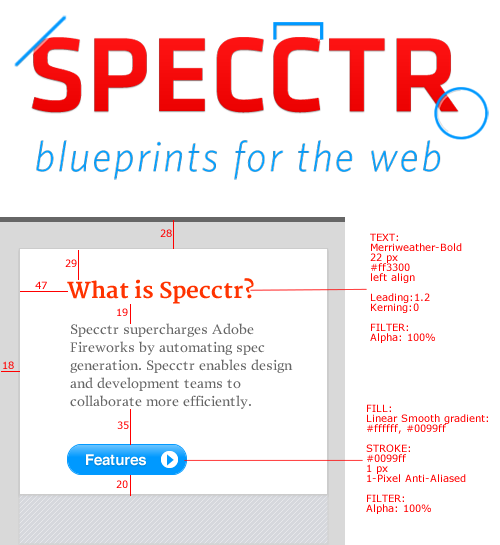
For those who aren’t familiar with the term in this context, “specs” is short for specifications — in the case of design, they are instructions that specify colors, fonts, sizes, spacing and so on, just like a blueprint. Specs are a crucial part of the design and development process for companies with big teams and for small companies that have to outsource some of their development. Specs function not only as instructions to developers, but also as a reference point to make sure the whole team is on the same page.
However, the process of producing specs is repetitive and time-consuming, especially for creatives. But now this can all change: Specctr, together with Adobe Fireworks, offers a quick and easy way to generate this important information automatically.
The Idea
My idea to make Specctr came from my personal experience working on a design team at a large corporation. Spec’ing was part of my routine. One day, after hours of spec’ing, my eyes hurt and I was bored and frustrated. Suddenly, I realized that this kind of intensive work should be automated, and that a designer’s time is much better spent designing rather than spec’ing.
Specctr is more than a tool: it is a business solution for any company whose designers must generate specs for developers. Specctr facilitates this communication and leaves designers and developers happier and more productive. Making this process quicker frees up the business to focus more intently on its core mission.
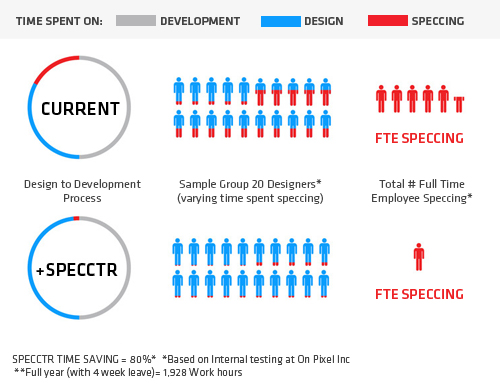
Possible time saved using Specctr for Adobe Fireworks.
Time saved using Fireworks and Specctr Pro.
In the process of creating Specctr, I brought my design background and practical experience in spec’ing to bear on the issues and opportunities in automating the process. Meanwhile, my colleague, Dmitriy Fabrikant, engineered the software from the ground up. Working in tandem at On Pixel, we released Specctr Pro in January 2012. Since then, it has received many favorable reviews.
Specctr Lite
In addition to the commercial version of the tool, we’re happy to release a free version called Specctr Lite as a contribution to the community. We chose to highlight width and height as well as text spec’ing abilities, because they are most common to a designer’s workflow. These two feature sets alone will save a lot of valuable time.
The Lite version includes:
- Width and height
- Text spec (font family, size, color)
- Expand canvas feature
Specctr Lite can be downloaded for free from our website, and we’re happy to say that it was created and released as a result of the involvement of Smashing Magazine!
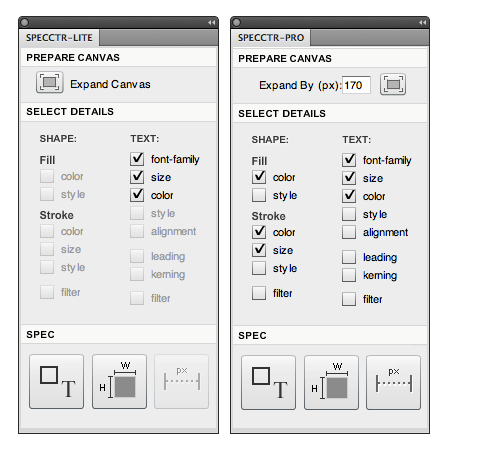
Pro and Lite: a quick comparison
The Lite version is as easy to use as the Pro version, and its features work the same way.
Requirements And Installation
To use Specctr (Pro or Lite), you need:
- A Mac or PC
- A copy of Adobe Fireworks CS3, CS4, CS5, CS5.1 or CS6
The installation process is pretty straightforward:
- Download the Specctr installer
- Double-click the MXP file to open the Adobe Extension Manager
- Click on “Install”
- Restart Adobe Fireworks
- In Fireworks, go to
Window → Specctrto open the Specctr panel.
Please note: If you are using Windows Vista or 7, you might need to launch the Adobe Extension Manager as Administrator, otherwise the extension could fail to install.
If you still have questions, don’t hesitate to consult our online tutorial (PDF, 1.9 MB) or contact us directly!
Specctr Pro
A Brief How-To Guide
Once you install Specctr through the Adobe Extension Manager, restart Fireworks, and then open Specctr from the Window menu. Now that Specctr is open, you can spec a document in a few easy steps.
First, prepare your document by making room for your specs. Select the size of your design’s border, and click on the “Expand Canvas” button.
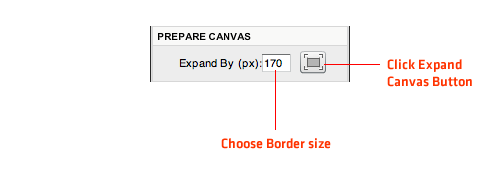
Select which details to display by toggling them on or off from the panel’s menu.
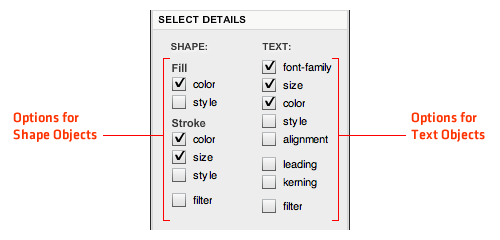
Now Specctr Pro will automatically display your spec with a click of the button.
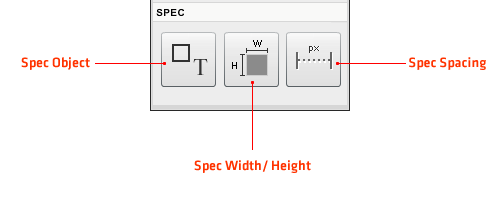
To spec a shape (shape, line, dot, etc.) or a text object, select the object (or multiple objects), and click on the “Spec Object” button. The specs will be outputted to the nearest edge of the canvas.
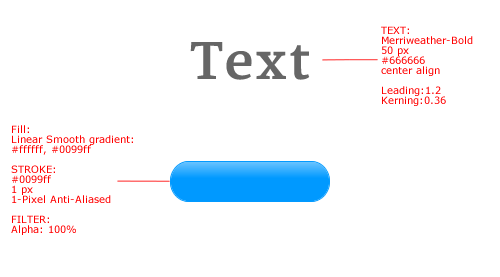
Properties of objects in a spec
You can also spec the spacing between two objects by selecting them and then clicking the “Spacing” button. If you select only one object, Specctr will measure the object’s distance to the edges of the canvas.
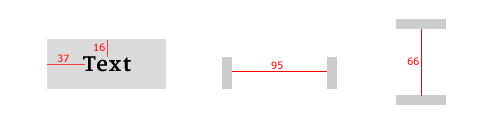
Measuring the space between objects
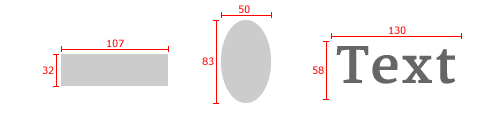
Finally, you can also spec the width and height of any object.
Insight Into The Fireworks Extension Development Process
The process of developing Fireworks extensions consists of the following steps:
- First, we design and build the panels in Adobe Flash Pro.
- We import the panels into Flash Builder and add the ActionScript code, which makes them run.
- Finally, we have to connect with the Fireworks API, which is written in JavaScript, in order to manipulate Fireworks.
Because the development process is spread over three separate environments, integrating the different pieces of the application and debugging the application present some challenges. But in the end, it’s well worth the positive response from our users.
In the next couple of weeks, Dmitriy will release on GitHub a few ActionScript libraries that he has built during the process of developing Specctr. These libraries will hopefully reduce some of the pain points of the tiered development process. We might also write another article that highlights in more detail the development process for building a Fireworks extension.
One of Fireworks’ strengths is its potential as a development platform that leverages the creativity and innovation of its community. We would love to help this process and show that Fireworks is a powerful tool for Web design.
Further Reading
Here are a few useful resources related to extending Adobe Fireworks:
Extensions
- Aaron Beall
- John Dunning
- Matt Stow
- Orange Commands, Ale Muñoz
Other Resources
- Extending Fireworks blog, Grady Kelly
- Extending Fireworks, Fireworksguru Forums
- “Creating Fireworks Panels, Part 1: Introduction to Custom Panels,” Trevor McCauley, Adobe Developer Connection
- “Extending Adobe Fireworks CS5” (PDF), Adobe Product Support
(al) (mb)


Dylan Valade
May 25th, 2012 6:21 amThis is great. I love seeing Fireworks getting love in the Smashing community. The recent post on some of the advanced stroke and shape editing was really beneficial and this article just saved me a couple hours a month. If you’re designing websites that don’t require 3D, Fireworks is the way to go. With seamless vector and bitmap editing, intuitive grouping and export to 32-bit PNG there is no need to use another tool for 90% of the sites on the web.
Michel Bozgounov
May 25th, 2012 10:19 amThen stay tuned for more Fireworks articles that we’re currently preparing for publishing! We hope you’ll find them useful and interesting! :-)
Dave
May 26th, 2012 7:11 amFireworks is my favorite and this article was incredibly timely for me, thanks!
Ryan
May 26th, 2012 1:03 pmGreat article. Can’t wait to try out Specctr.
Also, looking forward to more Fireworks articles. I use it almost exclusively and there’s just not enough talk about it.
Andre Reinegger
June 10th, 2012 11:01 pmI would love to see more articles like this!
There are so many great and powerful extensions for Fireworks out there (like TAP, CSS Professionalzr, Edge to Fireworks, Export Responsive Prototype, and many many more), which where worth getting an own article at Smashing Mag.
Todd Reynolds
May 25th, 2012 6:27 amSpecctr saves so much time. One of the best FW extensions ever created. Realistically, they could charge much more for the pro version. It’s worth every penny.
Dmitriy Fabrikant
May 25th, 2012 7:28 amThanks Todd! That means a lot.
Steven V
May 25th, 2012 8:32 amPerfect! It would be great to have a feature like this in InDesign or Photoshop!
Kevin
May 25th, 2012 9:23 amThis would be so useful in Photoshop! I would purchase that addon if it were available for CS5+.
jenni has her head in the clouds
May 25th, 2012 10:26 amI would LOVE this in photoshop!!
niv katz
May 25th, 2012 1:10 pmWOW! What a great tool!
I’m starting to really like Fireworks!
(-:
Geert-Jan Brits
May 25th, 2012 1:49 pmBrilliant!
Any chance of seeing this rebuild as a photoshop plugin?
At the current price, I’d buy it in a heartbeat
Geoff Schwartz
May 25th, 2012 2:36 pmI noticed in your tutorial (PDF) that units of measurement don’t appear after numbers when speccing distance. Is this feature available? ‘Leading’ is used for line height. Leading and points make sense in print, not in web development. Are these editable?
Thanks – looks good.
Chen Blume
May 25th, 2012 8:53 pmCurrently all of the spacing is measured in Pixels. We will add the ‘px’ in the next update. We hope to add the ability to spec in other units as well in the future.
Once the specs are created they are editable – just like a text box.
Although the term ‘leading’ originated in print it is knows to mean the distance between the baselines of successive lines of type. That said it’s a good idea to replace it with ‘line height’ to match css terminology.
Thanks for all the great feedback!
Chen Blume
May 25th, 2012 8:56 pmAlso we are looking into developing a Photoshop plug-in. Follow us on twitter for updates! https://twitter.com/#!/SPECCTR
Lasha Krikheli
May 26th, 2012 2:47 amThis is pretty fantastic! Like the many others above, I would LOVE to see this for Photoshop, and would easily pay for the convenience it would provide. :)
Monika
May 26th, 2012 10:17 amDon’t stop at photoshop. Please built it for illustrator too!
Jonas
May 26th, 2012 3:00 pmWhy do you need to write specs at all? If the developers open the files i Fireworks or Photoshop they could toggle the grid lines etc and measure it themself or am I missing something?
Joe
May 27th, 2012 2:19 pmMy thoughts exactly, really don’t understand the point of this?
Steve
May 27th, 2012 2:46 pmNot all developers and project managers have (much less understand how to use) Photoshop or Fireworks.
Jonas
May 29th, 2012 3:30 amThat’s a good point. The developers I work with usually slice up the graphics themselves and then they really need OS or Fw.
Daryl Barnes
May 27th, 2012 2:50 pmYou don’t understand how it is easier to not have to make sure grid lines are available for every single space between every object and toggle them on and off for everything? As a developer that regularly implements other people’s designs (as well as my own) I can say this extension saves a TON of time.
And besides, many mockups I get don’t even have grid lines set up in a way so that the correct grid lines are still available for all the right objects exactly as I need them. Many designers just use grid lines for on-the-fly positioning, not as a final spec.
And it’s not just grid lines. It shows the actual spacing right there on the design surface, the font used, line height, etc.
With this Fireworks extension, all of the specs are right there. You can even just print it out to work from it so that you don’t have to take up extra screen space or a second screen.
If you are used to taking designs and turning them into code or if you want to provide pixel perfect specs for your developer to make sure it is created exactly as intended, this is a fantastic extension. Especially in combination with Fireworks CS6 and its new CSS3 Properties panel.
Jonas
May 29th, 2012 3:38 amAll I can say is that if the designer doesnt bother with finishing up the sketches then he/she is a sloppy one. If you the go and generate the specs from that document the specs would be crazy wrong anyway. Now this script solves the issue but if I were a client and had to pay the agency for the specs work instead of the agency buying a Fw licence for the programmer I would be quit irritated.
Douglas Bonneville
May 29th, 2012 11:08 amThe specs settle disputes and sets expectations for future rolls outs of new pages based on the existing design.
The number ONE most powerful tool for settling design disputes is: it’s not in the spec. Or some variation on that. Works every time. You don’t need to “make your point” in a meeting if you can just point to the spec everyone agreed on, without opening management to a domino effect of other changes.
MOF
May 26th, 2012 5:43 pmThis function will be very very useful to designers! Thanks
Paul
May 27th, 2012 4:59 amAfter the absolutely disappointing update of Fireworks from CS5.1 to CS6.0 this is actually a welcome feature, which should’ve been built in from the start. I wish adobe gave Fireworks the same amount of love :)
Steve
May 27th, 2012 9:20 amWhile I don’t doubt that Specctr might be faster, the side-by-side speed comparison video insults a professional designer’s intelligence with the painfully slow ineptness of the non-Specctr user. I really have to wonder what else is being grossly exaggerated about the product.
Mike Mai
May 28th, 2012 12:26 pmChen, you are awesome. Great to see you writing on Smashing!
Chris Ota
May 29th, 2012 11:48 amInteresting work flow. Being a designer and front-end developer, I’m not sure I would use this since I don’t distribute layouts to anyone unless it’s marked-up already. Great concept and I would love to see something like this for Photoshop.
Pravash Karki
June 1st, 2012 7:44 pmThis is freaking awesome. I just got a copy of it.
Great work guys.
Matt
June 5th, 2012 3:40 amWould love this for illustrator
bogdan
June 18th, 2012 12:44 amvery nice tool, i would use it for a different purpose: logos. i find it very handy in making a logo guide.
Michael J. Morgan
December 11th, 2012 3:13 pmMany people don’t realize how amazing Fireworks can become with extensions such as this (and Orange Commands, 960.gs, etc…) Immediately upon testing this I messaged my project manager about purchasing a license. Thank you!
drew
December 13th, 2012 6:26 amOMG I am moist, why have I never found this product before today?
My life is complete!
Thank you.
John Dunning
January 30th, 2013 4:55 pmDid those ActionScript libraries ever get pushed to GitHub? I’d be curious to what sort of techniques you used for the panel.
Dmitriy Fabrikant
February 12th, 2013 12:23 pmHey John, the libraries are a little bit hacky right now and we are working to get them in presentable shape. Hope to have something published soon.